Are you a business that finds it difficult to choose the right box when shipping your product to your customers? If yes, then this place is for you. The solution to your difficulty is to use the right box template. This will help you find the right size and shape for the packaging. With the right box template at your end, you can save overall cost and time spent on trying different-sized boxes.
A custom box template can be made in any size and shape to make your product fit. This template works as a die line to provide structural accuracy to your final box. This is why it is important for brand owners, graphic designers, and procurement managers to learn how to use them for cutting and folding. You will learn about different types of box templates and where you can get them made in this guide.
What Is a Box Template, and How Does It Work?
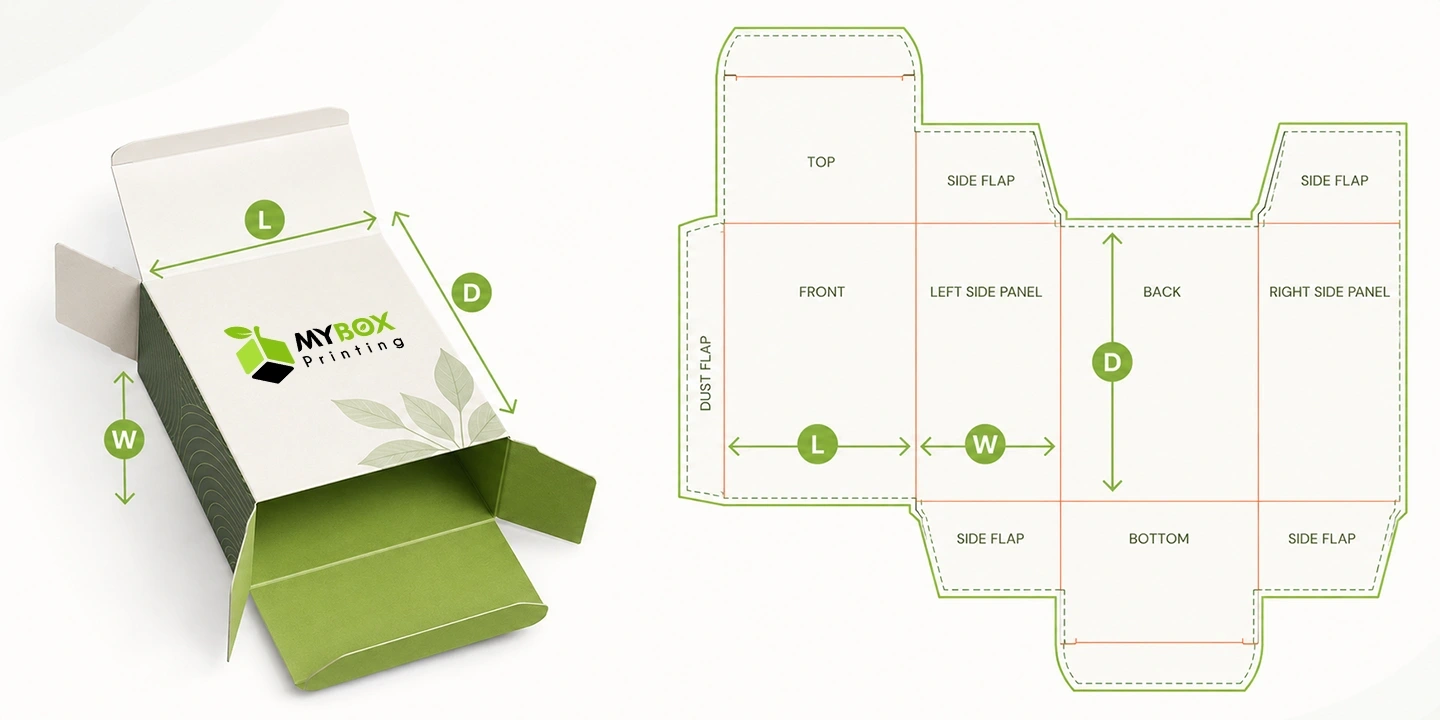
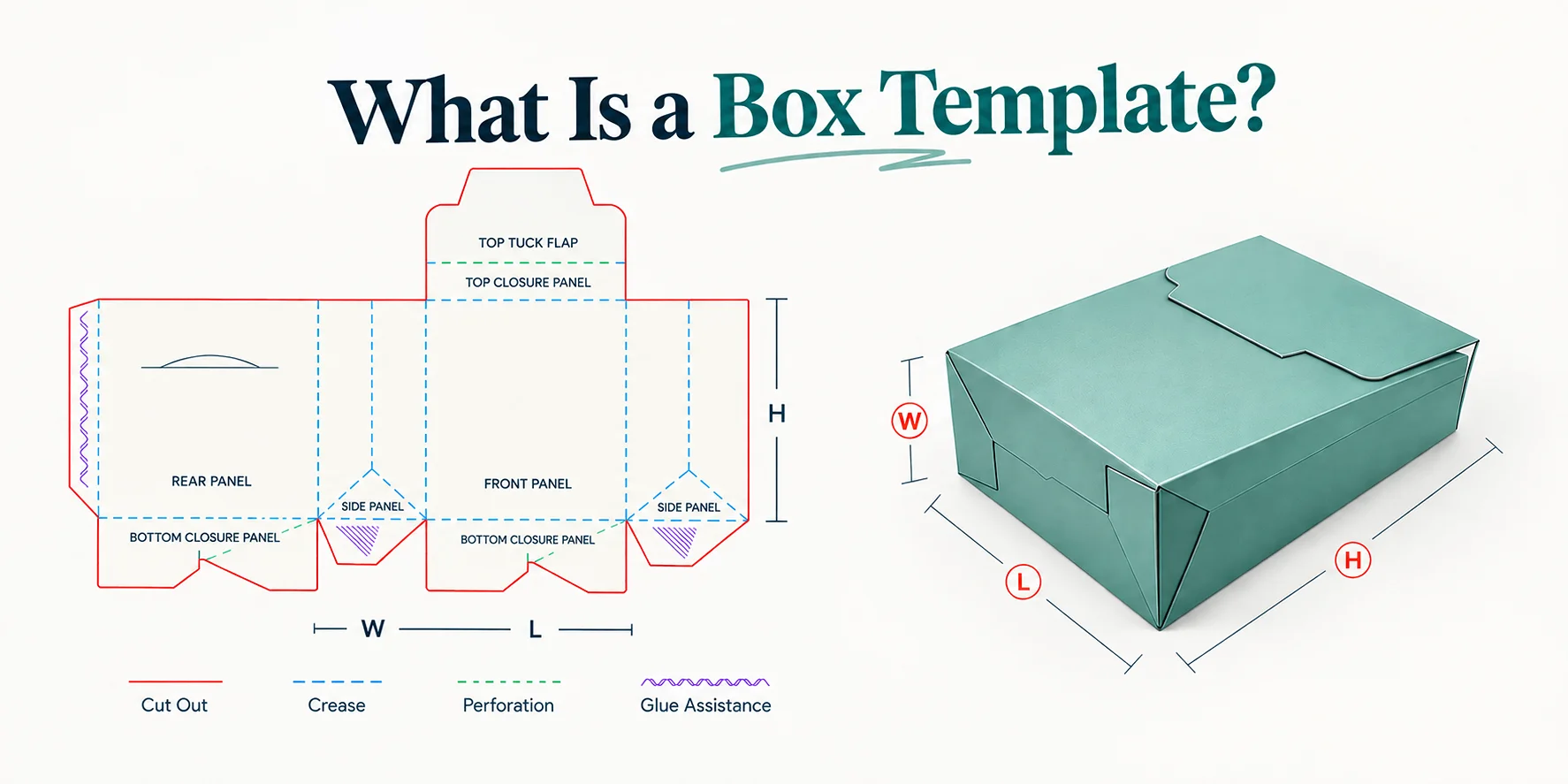
This is the technical 2D layout that defines the structure of the box along with the shape before the start of production. It helps you define where you have to cut, fold, and glue. The printing and assembling of the box become inconsistent without the right template. This can lead to costly production errors.
You can say that the templates of the boxes work as a guide or starting point to lead the entire packaging process. It shows where the machine has to trim and where the creasing tool needs to fold the box. It also helps gluing operators to know where to seal the box. In simple words, the whole process becomes easier while providing maximum accuracy.
Key Components of a Box Template
The template or prototype of the box consists of the following key components that help in structuring the box without any errors:
Die-Cut Lines: Where the Box Gets Trimmed
These are lines that exactly outline the packaging. They are solid lines and indicate where the cutting tool should trim the material to create edges and flaps.
Creasing Lines: Where the Box Gets Folded
Most of the time they are shown in dotted or dashed strokes to show where the material will be folded. These lines guide the creasing tool to create flexible hinges without breaking the printed surface.
Glue Tabs: Where the Box Gets Sealed
They are small extensions that are used to connect the panel and help give the box its final shape. Their accuracy helps in determining how the packaging can be assembled and how secure it will be.
Panels and Flaps: Print Surface vs. Structural Support
The flaps are used to provide support and work as lids and locks of the box. Whereas the panels are the sides on which you can print your brand info.
Apart from the above-mentioned components, there are many others too. Read here in detail about what a die line is.
What Are the Top Types of Box Templates and Their Applications?
Whether you need a cosmetic box for your brand or a cereal box for your food company, you can get the prototype made using different resources. Before moving to the resources, let us first explore what type of templates we have for boxes. A few of them are mentioned below:
Standard Retail & Folding Carton Templates
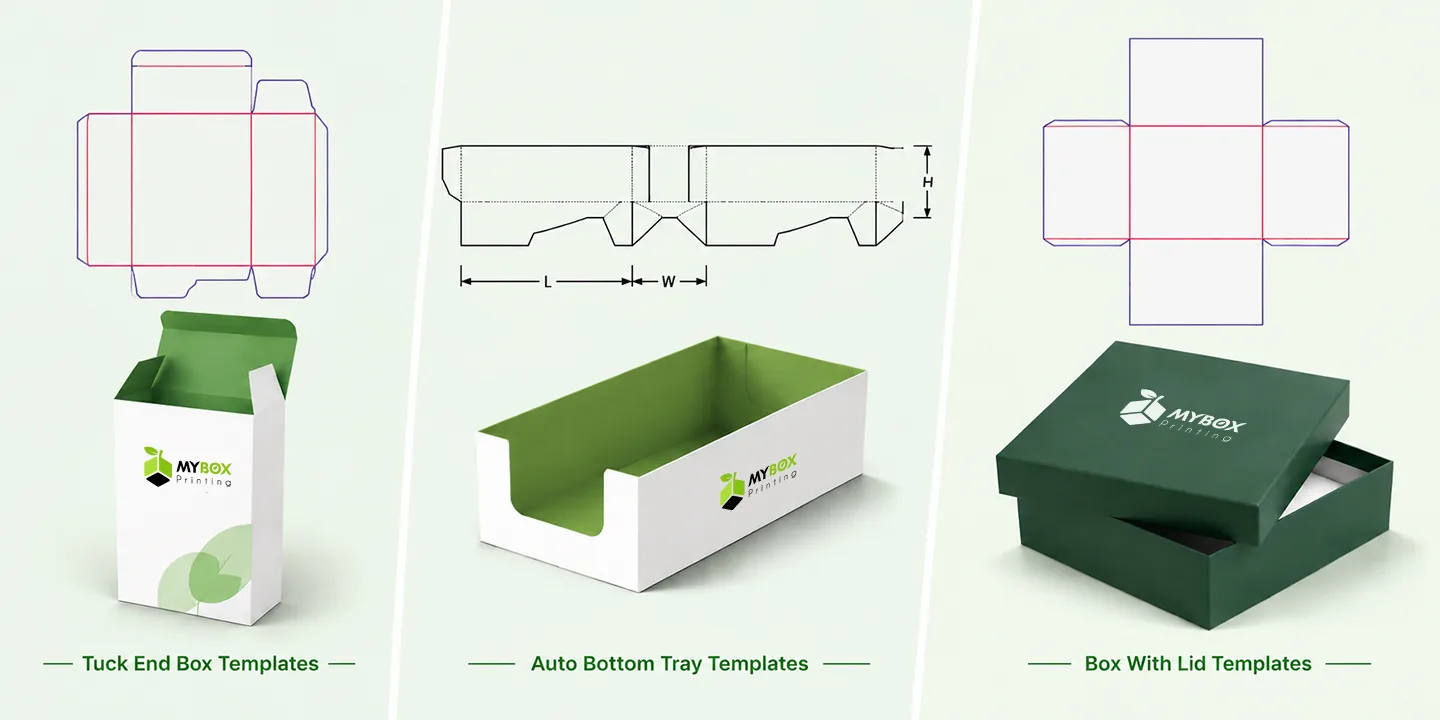
Tuck End Box Templates
This template has flaps that can be folded to close the box without any additional adhesive. The layout shows the main panels and flaps. You also get the markings for tuck-in closures and cut-and-fold lines. It can be used for boxes for skincare and small retail products.
Auto Bottom Tray Templates
The connected panels and locking tabs are shown in this template. It also includes pre-glued bottom sections to form the box. The bottom panels are arranged in such a way that the product automatically locks in. Many food products and electronic items are packaged in this type.
Box with Lid Template
It consists of two layouts. One for the base and the other for the lid. The template includes the folding lines and corners along with the measurements to make the lid fit accurately on the base. Luxury jewelry and cosmetic brands use boxes of this style.
Shipping & E-Commerce Box Templates
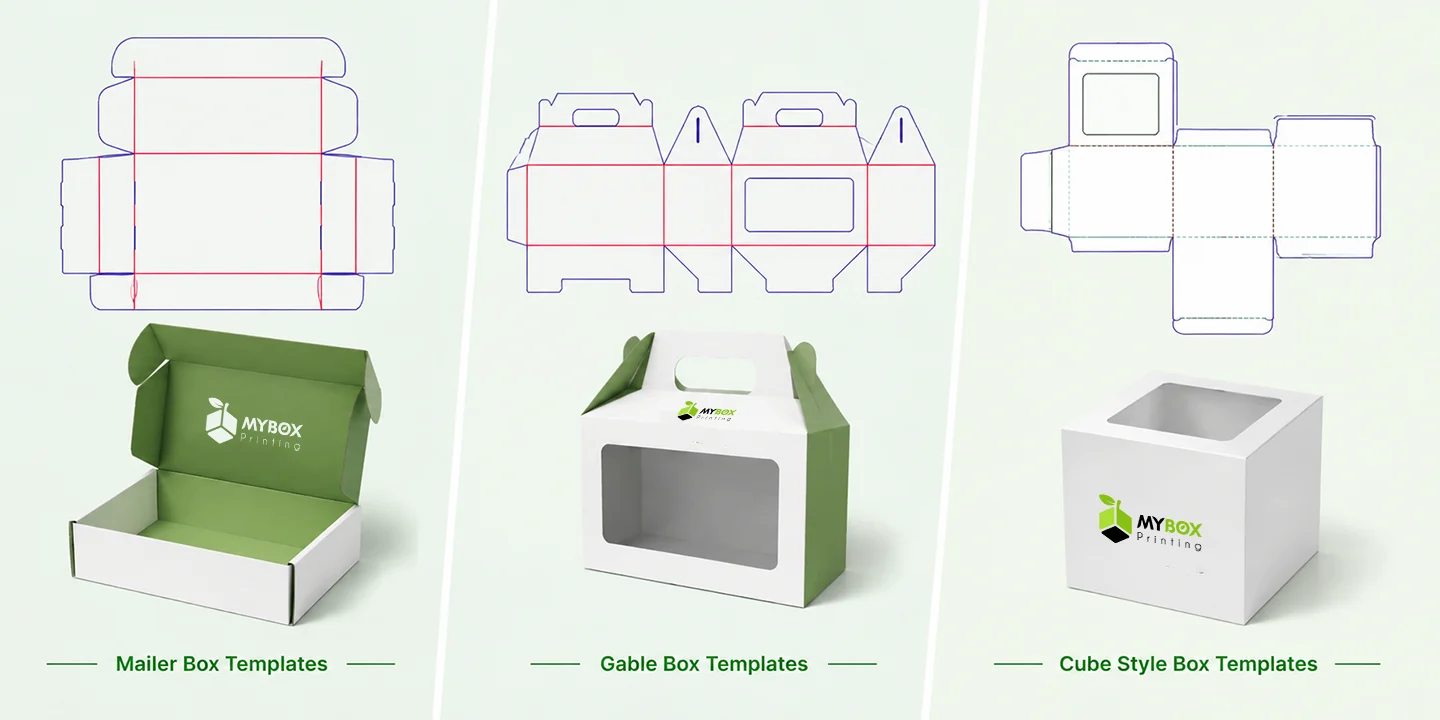
Mailer Box Template
The layout of this type of box shows a main base with side walls and flaps. It also includes folding panels and locking tabs in one connected layout. Businesses use these boxes for e-commerce orders and subscription boxes.
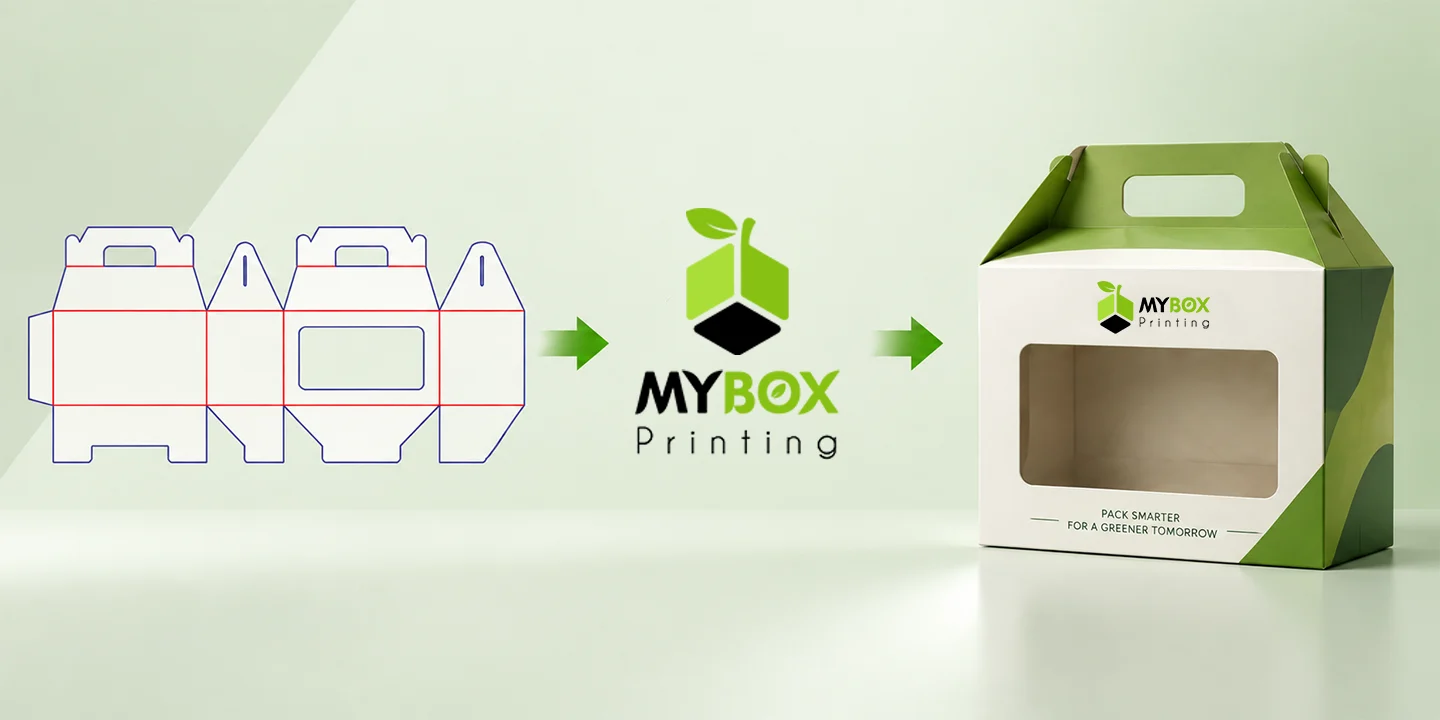
Gable Box Templates
You get a main body layout with the extended upper panels in this template. It has folded lines and die-cut handle areas to assemble the box. Food companies like McDonald’s use these types of boxes for food takeaway.
Cube Style Box Template
The template shows the equal measurements of the box from each side. It consists of lines showing where they need to be cut and folded. You can use this type of box for products like candles and small gift items.
Specialty & Display Packaging Templates
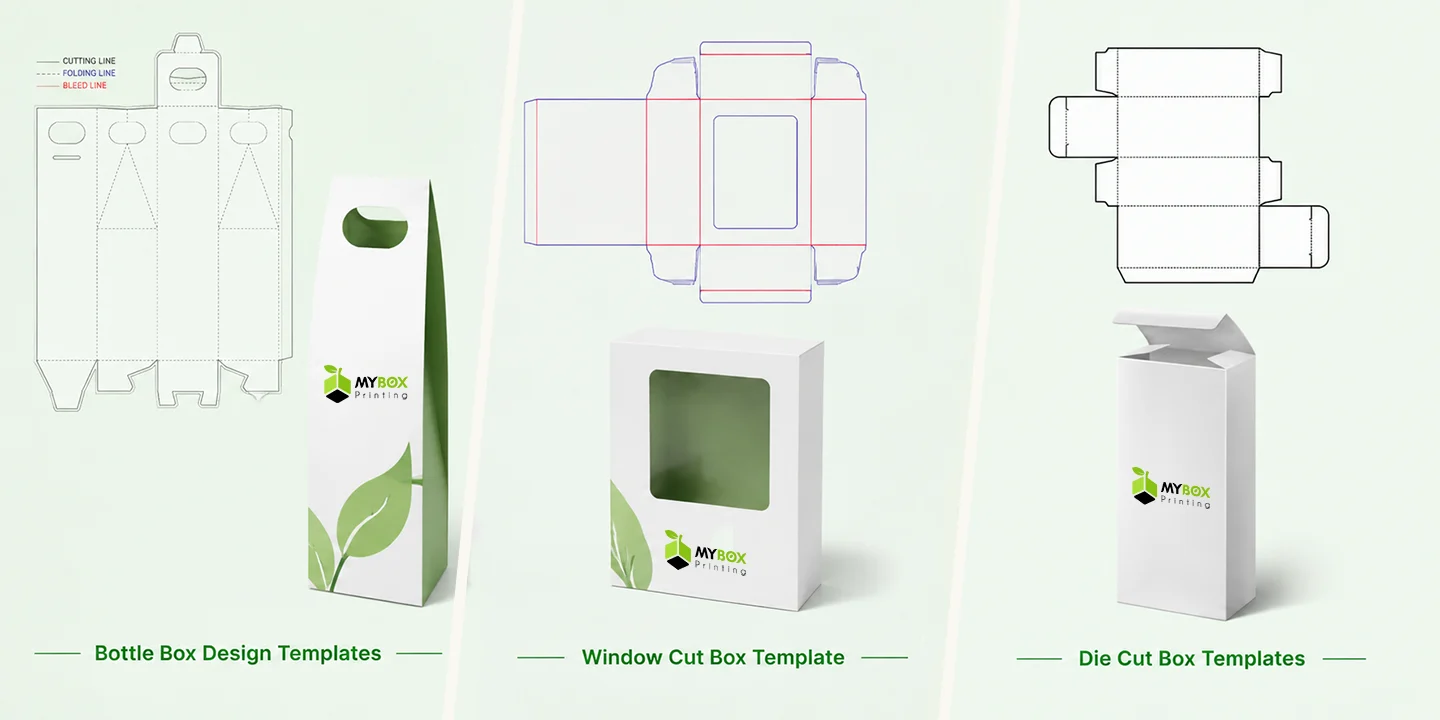
Bottle Box Design Templates
The panels and flaps are sized around the height and weight of a specific bottle. Optional inserts and dividers to hold the container are included in this. The box is good for perfumes and wine bottles.
Window Cut Box Template
This style template has a marked opening within one of its panels. The layout defines the size and position of the window in cut and fold lines so the cutting is done accurately. Many companies use die-cut window boxes, such as bakeries and toy manufacturers.
Die Cut Box Templates
You get a complete flat pattern in the design and shape of your choice. It includes precise cut lines and fold lines. Unlike the other box templates, these can be created in any shape or size. Many companies make their promotional packaging and food boxes in custom designs using these templates.
Other Popular Box Template Styles
Some of the other famous box templates are
-
Magnetic Closure Box Template
-
Book Style Box Template
-
Collapsible Rigid Box Template
-
Folding Carton Box Template
-
Sleeve Box Template
How to Create a Custom Box Template
If you are a small business or a newcomer in the industry and want to create packaging for your product but do not know where to start, you do not need to worry. Here are a few top options you can choose to create a template for the boxes:
Option 1. Go for a Professional Packaging Manufacturer and Designer
There are many companies available on the internet or in the market that will assist you in designing the layout for your boxes. Here are some of the top options:
My Box Printing: Custom Dieline & 3D Mockup
We are a custom packaging manufacturer that creates box dielines and templates. We also provide 3D mockups before production. The plus point is that the team will analyze each aspect of the product, like size and shape, and create a layout with lines and cuts.
99 Designs: Freelance Packaging Designers
The agency claims they have packaging designers who help you craft a layout for your boxes according to your needs. You can specify your requirements and get the templates made.
Option 2. Use Online Box Template Generators
You can go for online tools that help you create a digital die line of your box. Mentioned next are some of the famous online tools:
Pacdora: Online Template Dieline and 3D Mockup Generator
It is an online 3D custom packaging design tool that provides die-line templates and 3D mockups for your boxes. You get the ability to customize the dimensions and paper thickness, along with materials. You can select the structures according to your preferences.
Box Template Studio: Browser-Based Dimension Inputs
This online tool provides you with the ability to input the dimensions of the boxes and lets you create the layout accordingly. It allows you to personalize the fold lines and paper size right from your browser. You can also choose from different box styles for the templates.
Option 3. Vector Design & CAD Software
Another option you can try to make your product boxes assemble perfectly by creating a template is to use dedicated software. Provided below are the tools you can use to design the layout of your box:
Adobe Dimension: 3D Packaging Templates & Mockups
The tool is useful for designing 3D presentations of your templates. Companies can apply their brand artwork to these templates. It also lets you view the design from different angles before production. The platform is helpful for marketing visuals and packaging prototypes.
Illustrator and InDesign: 2D Box Dieline & Packaging Texts
You can use this platform to create a 2D box dieline. It offers accurate tools to draw cut lines and fold lines. On the other hand, InDesign is useful when you have a large amount of text. Content like ingredients or product instructions can be displayed on the boxes.
Step-by-Step Guide: How to Make a Paper Box Template
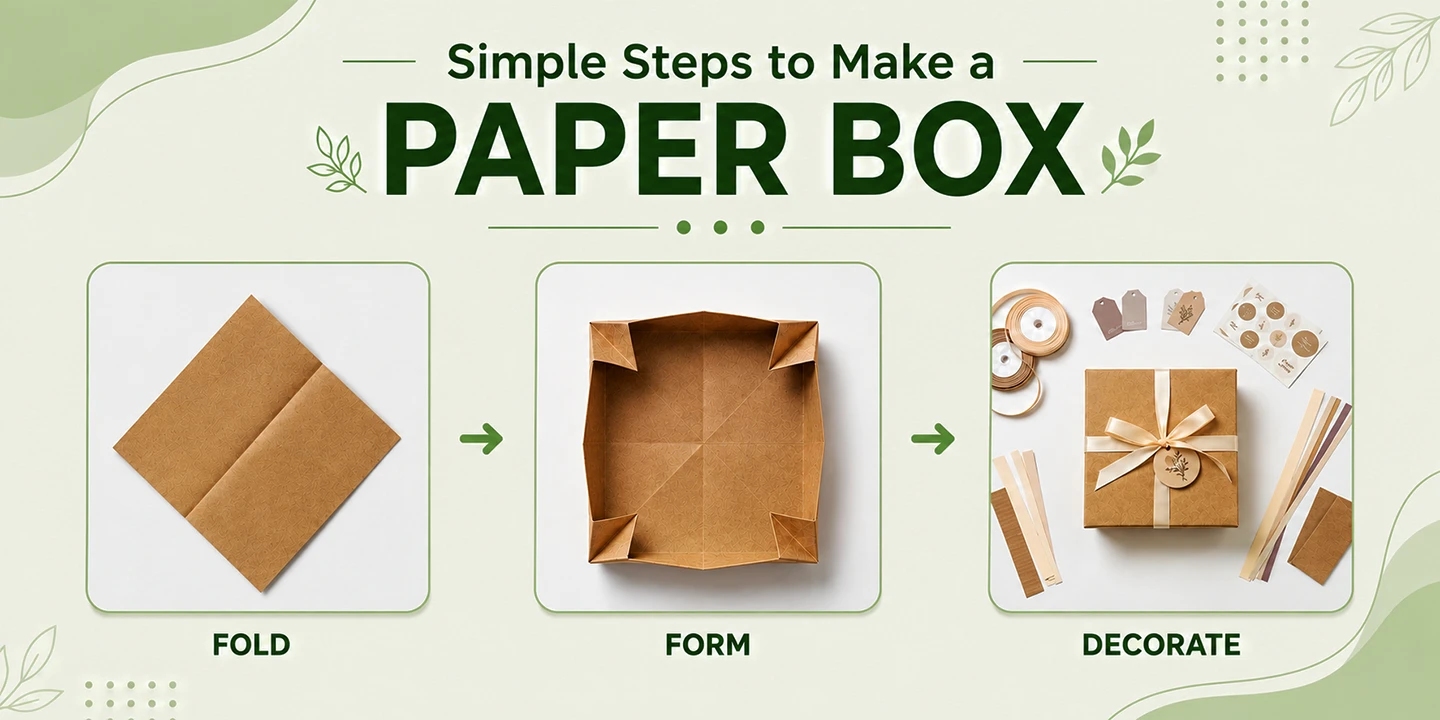
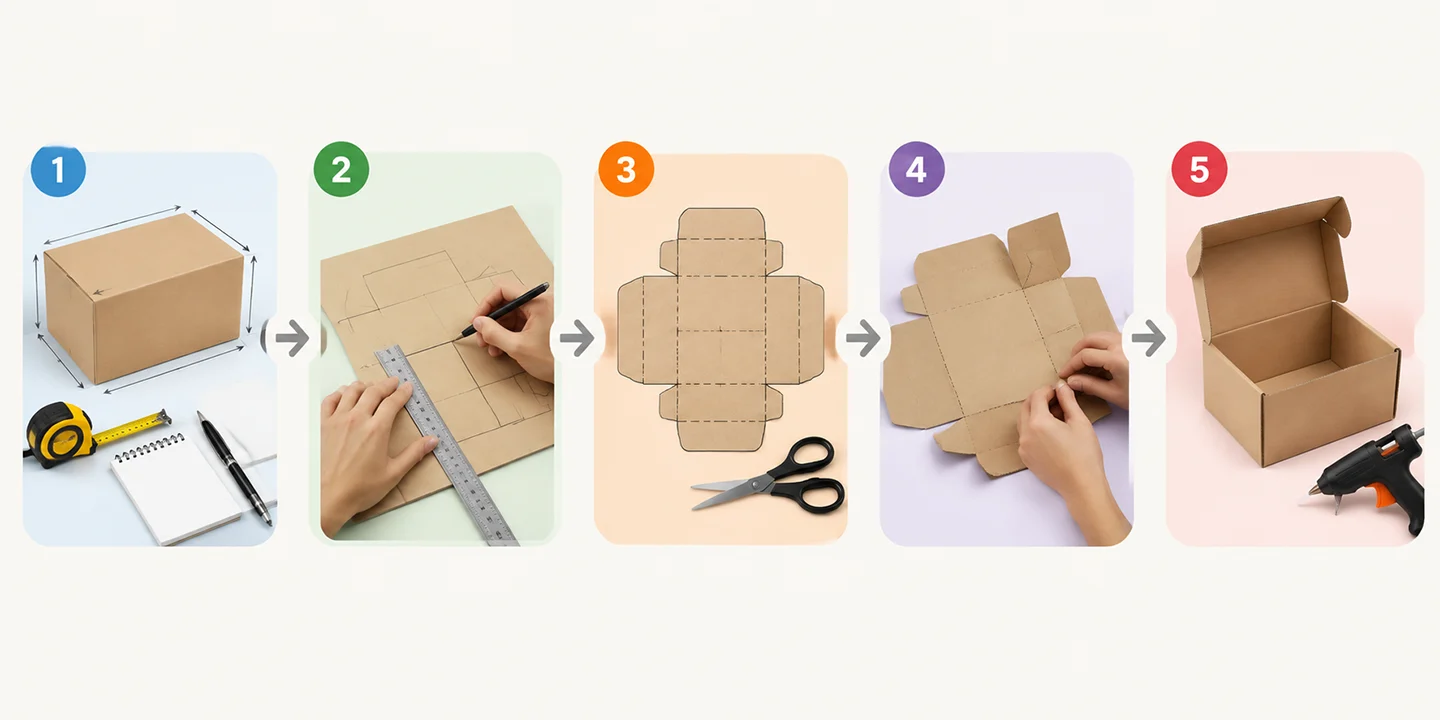
You can also make a box template on your own using materials like cardboard. This will help you measure and identify each aspect according to the product requirements. Here is how you can make a paper box template:
-
Measure Product Dimensions: Start to measure the dimensions of your cardboard box according to the length, width, and height of your product. Use a measuring tape to mark down all the values. Now add one inch to each of the product dimensions.
-
Draft Layout on Cardboard: Mark the cardboard with the measurements you have taken using a pen or marker. Now adjust the dimensions of the sheet accordingly.
-
Mark Cut & Crease Line: Cut the sheet in the pattern you marked using sharp scissors. Now draw the dotted or dashed lines to mark the folding and bending of the flaps and panels.
-
Score and Crease Joint Edges: Fold the box edges where you marked the dotted or dashed lines. Try to fold the flaps all the way and flatten the fold again.
-
Glue and Inspect Assembly: Finally, assemble the box using a hot-glue gun. Review the assembled template once all the parts are connected together.
Key Business Benefits of Choosing Custom Box Templates
You get greater control over how your box will look and fit when you opt for custom box templates for your products. You can create a layout based on the exact dimensions. Here are some of the advantages of opting for custom layouts:
Accurate Product Fit
You get to set the exact size of the required product with custom templates. This reduces the empty spaces inside the box and prevents the product from moving too much during shipping.
Better Product Protection
Expert designers create a layout with proper dimensions, with spaces for dividers and inserts. This gives extra protection to the product from breakage.
Material Waste Reduction
The boxes are produced in the right size when you have accurate dimensions from the prototype. This leads to less waste of material from extra cutting.
Faster & Easier Production
The cuts and folds are clearly defined in the template. This is helpful, and the production process becomes easier and faster.
Strong Brand Presentation
You can ask the designers to plan each panel of the template according to your branding needs. This gives you the freedom to add your logo and other business details according to your preferences.
Accurate Shipping Cost Estimates
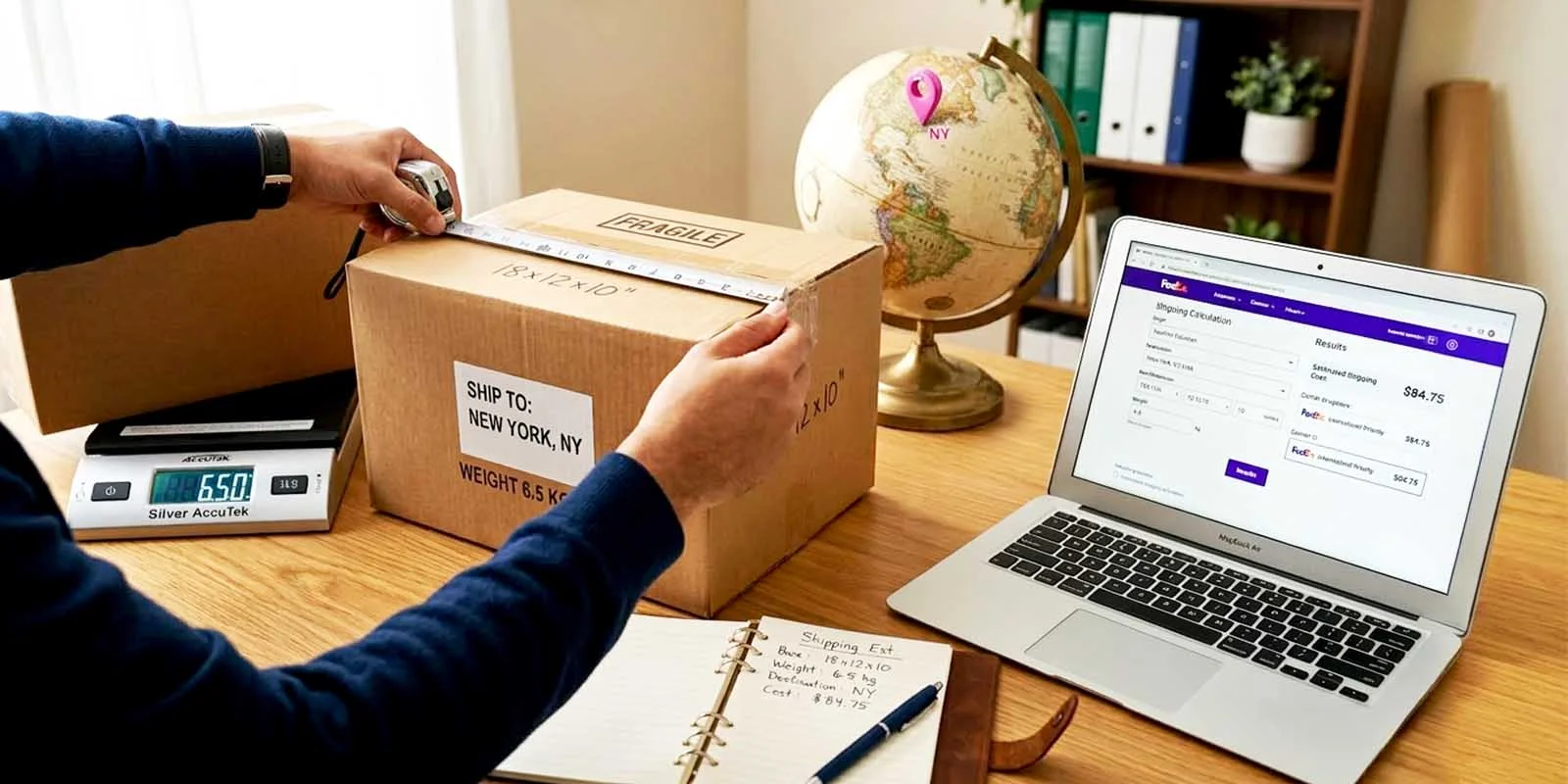
The right box template has accurate measurements, which helps you with shipping cost estimation. They save you many additional charges and time when producing boxes without any template.
Represent Your Product with the Right Box Template Today
You can get the box templates made no matter what the size or the shape is. If you are still confused about which option to go for for the layout of your box, try contacting My Box Printing. Our experienced designers will work closely with you while deeply analyzing each of your requirements and products. details. We have been in the business for many years now and provide high-quality packaging with complete customization. Reach out to us and request a free sample for your box today!
Frequently Asked Questions About Box Templates
Why do I need a box template?
They help you create packaging for items with the right structure and dimensions. This can minimize mistakes in sizing and production problems before manufacturing the actual boxes.
What information is required to make a box template?
You can provide details like the dimensions of your product to create the box. It is also recommended that you mention whether you need inserts or dividers in the box.
How many types of box templates are there?
There are numerous types of box templates according to the product needs. Some famous types are tuck end, pizza boxes, and popcorn boxes.
Which template is best for cosmetic boxes?
A box with a lid and a tuck end can be considered the best for your makeup products. The final selection depends totally on the product size and level of protection required.
Can these templates include windows?
A window cut can be included in the template if you want to display the product inside to the customers. You can specify how big and in what shape you want the window.
Are online box template generators useful?
They make the process easier by letting you enter your requirements and select the template. You can test the folding points and overall structure through it.
How do templates reduce material waste?
You know the exact amount of material required for producing the box when you have already made a template. This can save you from incorrect layouts or extra cutting of materials.
Should I hire professionals to create box templates?
Hiring expensive professionals to create a layout can disrupt your overall budget. Hence, you can opt for My Box Printing. We provide free design assistance to create packaging that can help you create high-quality product boxes.
How Long Does It Take to Receive a Template from My Box Printing?
We provide fast processing of orders with a total turnaround time of 4-6 business days. You will get your order delivered to your doorstep within the given time.
Can I create boxes without templates?
You can make boxes without templates. However, it will cost you extra material and time for measuring and marking each box separately.
Final Words: Choosing the Right Box Template
The article discussed all the details you need to know about what box templates are and how you can make them. We discussed various options that you can try to create boxes that best fit your product. However, one of the best ways is to opt for My Box Printing as your packaging partner to generate accurate layouts for your boxes.